Is Horde Convoy Safe for Kids? Ads, Data and Age, Explained
Horde Convoy is a single-player zombie shooter with no purchases, no chat and no account. It shows optional rewarded ads and a short ad after some wins, and it shares ad and analytics data with Google. Its story is written for ages 12 and up, with no blood or gore.
The game is not designed for children under 13, so check the official rating on Google Play before you decide. This page is for parents, guardians and teachers. We make the game at Diffwise Games (listed on Google Play as ReppingLabs), and every answer below matches our privacy policy.
Key takeaways
- No in-app purchases, no subscriptions and no way to spend money inside the game.
- No chat, no multiplayer and no account. Progress is saved only on the phone.
- Rewarded ads play only when the player taps. A short ad may show after some wins, never during combat.
- The game shares ad, analytics and crash data with Google, under Google’s consent rules where they apply.
- Reminder notifications are off unless allowed: at most 1 per day, for up to 7 days after the last play.
- The story is written for 12+. Google Play shows the official age rating for your country.
Is Horde Convoy safe for kids? The short answer
For teens, Horde Convoy is a low-risk game on the money and contact side. Nobody can message your child, and nothing can be bought. The main things to weigh are the zombie theme, the ads and the data Google receives.
For younger children, our honest answer is different. Horde Convoy is made for a general audience and is not directed at children under 13. The story is written for ages 12 and up. If your child is under 13, use the official rating and your own judgment, and consider the parental controls described below.
| Question parents ask | Answer |
|---|---|
| Can my child spend money? | No. There are no in-app purchases or subscriptions. |
| Can strangers contact my child? | No. There is no chat, multiplayer or friend list. |
| Does it need an account or email? | No account of any kind. |
| Does it show ads? | Yes. Optional rewarded ads, plus a short ad after some wins. |
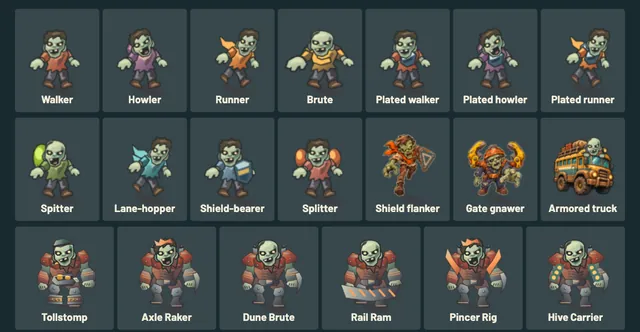
| Is there blood or gore? | No. Defeated zombies scatter into dust. |
| Does it ask for location, camera or microphone? | No. |
Where does Horde Convoy show ads?
Horde Convoy is free, and ads pay for it. All ads come from Google AdMob. There are two kinds:
- Rewarded ads play only when the player taps a button, for example for extra coins, a revive, a booster or doubled rewards. Google describes these as ads users choose to watch in exchange for in-app items.
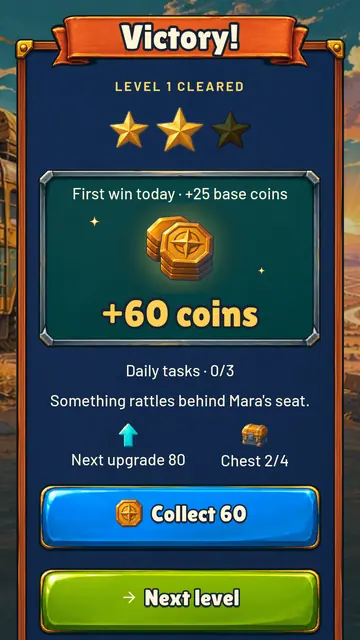
- Interstitial ads are short full-screen ads that may appear after some level wins, on the result screen.
Ads never appear during active combat. The first levels and first minutes have no interstitials. This follows Google’s guidance to place interstitials at natural transition points, not in the middle of play.
Ads need an internet connection. The game works the same with or without a connection.
What data does Horde Convoy collect?
Game progress, coins, upgrades and settings stay on the phone. We do not run a game server or cloud save, and Android backup is off for the game’s data.
The game does send some data to Google through three software kits:
| Kit | What it receives | Why |
|---|---|---|
| Google Mobile Ads (AdMob) | Ad views and taps, device identifiers such as the advertising ID, diagnostics, approximate location from the IP address | Showing and measuring ads, fraud prevention |
| Google Analytics for Firebase | Game events such as level results, boss results and tutorial steps, plus device model and app version | Balancing difficulty and improving the game |
| Firebase Crashlytics | Crash details, app version, device model | Finding and fixing crashes |
Where the law requires consent, such as in the European Economic Area and the United Kingdom, Google’s consent message asks first. You can change those choices later in Settings → Privacy options. Analytics data is kept for at most 14 months, and crash reports for 90 days.
Before installing any app, you can read its Data safety section on Google Play. Developers fill it in to describe what they collect and share. Compare it with the developer’s privacy policy, as we do above. Our Google Play Data safety section lists the same data types: approximate location, device IDs, diagnostics, crash logs and app interactions, all encrypted in transit.
No purchases, no chat, no account
These three absences matter most for families, so here is what each one means in practice.
- No purchases: coins are earned only by playing. They have no cash value and cannot be bought. There is no store screen to tap by accident.
- No chat: Horde Convoy is single player. There are no messages, lobbies, leaderboards with names or friend requests.
- No account: your child never types a name, email or password. The trade-off is that progress lives on one phone. Uninstalling the game or switching phones resets it.
What age is Horde Convoy for?
We wrote the story for ages 12 and up. Mara Vale, a former long-distance bus driver, leads a convoy with field medic Iris Quill and tow mechanic Tomas Reed. The tone is tense but not graphic.
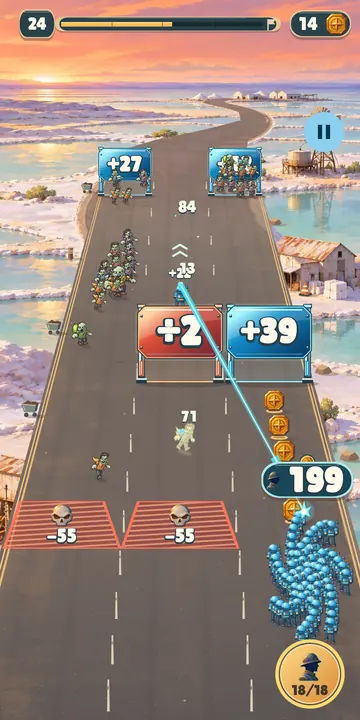
The enemies are infected people called the Bloom-sick. The squad shoots them, and defeated zombies scatter into dust. There is no blood or gore. Bosses are large creatures that stomp and sweep across lanes.
For the official age rating, check the Horde Convoy listing on Google Play. Google Play shows a rating from a rating authority such as ESRB or PEGI, depending on your region, through the IARC process. We do not repeat a specific rating here, because the rating you see can differ by country.
The official rating can be lower than our 12+ writing guide. Ratings judge content such as violence. Our guide also considers the zombie theme and the ads. Use whichever is stricter for your family.
Notifications and screen time
Horde Convoy can send “convoy radio” reminders about supplies, recovery, the daily streak and the story. They stay off unless the player allows them, and Android asks for permission first. The game sends at most 1 per day, for up to 7 days after the last play, and then stops.
To turn them off, open the game’s Settings and choose Disable reminders. You can also block them in Android settings. The game has daily tasks and a daily streak, so set your own screen-time limits if that matters in your home.
Parental controls on Google Play
Google Play lets you set content restrictions by rating, protected by a PIN or managed through Family Link. Once set, Google Play blocks downloads above the rating you choose. This is the most reliable way to apply your own age line to every game, including ours.
Google also runs a Families program with stricter rules for apps aimed at children. Horde Convoy is not a children’s app, so it is not built for that program.
Verdict for parents
Horde Convoy suits teens who like zombie action: no spending, no strangers and no gore. Expect ads, and know that Google receives ad and analytics data. For children under 13, check the Google Play rating first and set content restrictions. Questions? Read the privacy policy or email us from the support page.
Frequently asked questions
Is Horde Convoy safe for kids?
Horde Convoy has no purchases, no chat and no account, so nobody can contact your child and nothing can be bought. It does show ads and shares ad and analytics data with Google. The story is written for ages 12 and up, and the game is not directed at children under 13.
Does Horde Convoy have in-app purchases?
No. Horde Convoy has no in-app purchases, subscriptions or paid items. Coins and upgrades are earned only by playing, and they have no cash value. The game is free and supported by ads from Google AdMob, including optional rewarded videos the player chooses to watch.
Does Horde Convoy show ads to children?
Horde Convoy shows rewarded ads only when the player taps, and a short ad may appear after some wins on the result screen. Ads never play during combat. The game is made for a general audience, not for children under 13. Interstitials do not appear in the first levels.
What age rating does Horde Convoy have?
Check the Horde Convoy listing on Google Play for the official rating in your country. Google Play shows ratings from authorities such as ESRB or PEGI through the IARC process. We wrote the story for ages 12 and up, with no blood or gore. The official rating can be lower than our guide, so use whichever is stricter.
Can kids chat with strangers in Horde Convoy?
No. Horde Convoy is a single-player game with no chat, no multiplayer, no friend list and no named leaderboards. There is no account or profile to find. The only content in the game is the story, the levels and the ads served by Google AdMob.
What data does Horde Convoy share?
Game progress stays on the phone. Google receives ad interactions, device identifiers such as the advertising ID, game analytics events and crash reports through AdMob, Firebase Analytics and Crashlytics. Where consent is required, Google’s consent message asks first, and choices can be changed in Settings → Privacy options.
How do I stop Horde Convoy notifications?
Reminders are off unless allowed. If they are on, open the game’s Settings and choose Disable reminders, or block notifications for Horde Convoy in Android settings. The game sends at most one reminder per day, and only for up to 7 days after the last play.
More Horde Convoy guides
- Zombie Games With No In-App Purchases (and Only Optional Ads)Which Android zombie games have no in-app purchases? How to check Google Play labels, what “not pay to win” means, and how optional rewarded ads work.
- What Is a Crowd Runner Game? Gate, Lane and Squad Shooters DefinedClear definitions of crowd runner, math gate runner, lane shooter, squad shooter and hybrid-casual games, and why so many mobile ads show crowds and gates.
- Good Games to Play Without Wifi on Android: Zombie EditionZombie games that play without wifi on Android, a 6-step airplane-mode test to check any game works offline before a trip, and what still needs internet.
- Horde Convoy Beginner and Boss Guide: How to Beat Every BossBeat every Horde Convoy boss: read the lane warnings, dodge to stagger, time Airstrikes and pick perks. Beginner tips from the team that built the game.
Sources
- Apps & Games content ratings on Google Play, Google Play Help
- Understand app privacy & security practices with Google Play’s Data safety section, Google Play Help
- How to set up content restrictions on Google Play, Google Play Help
- Google Play Families Policies, Play Console Help
- Interstitial ad guidance, Google AdMob Help
- Overview of rewarded ad units, Google AdMob Help